Have you built something yourself with vibe coding and are you encountering the same questions?
Contact us
Blogs
July 7, 2026
A few weeks ago, I was having coffee with my Ability colleague Jan Kooistra. Ability has recently been running hard with new customers, whereas the past months were quite different. I asked Jan what he was doing differently. His answer was simple: he worked his network intensively, coffee here, dinner there, a lot of online contact, and he posted something relevant on LinkedIn every day. Not to go viral, but to stay top of mind, to keep the conversation going, and occasionally to catch a lead.
I am a commercial manager in IT, so I feel daily what AI does with our sector and with Smartshore. I follow the news, talk with colleagues, and have a reasonable image of what AI can do and how fast it is progressing, even though I'm not a techie. Smartshore is, of course, part of this. We use AI in all our projects, have our own tool, Ada Lovelace, and our developers write the best possible code with AI.
To better understand what I actually sell as a commercial person, I decided to experience it myself. I went vibe coding, building an application that generates, schedules, and publishes LinkedIn posts for me, so I would never forget to post daily again. Everyone at Smartshore works with Claude; I do too, but until a few days earlier, I had only looked at Claude Code out of curiosity. This time, I really started working with it.
With the help of Claude.ai, I set up my briefing for Claude Code. In hindsight, that briefing shows precisely how it is with my technical knowledge: with the right help, I could produce a prompt that sounds like it came from an experienced developer, even though I didn't know the exact meaning of a big part of the terms in it.
Build a complete web application that allows me to generate, approve, and automatically publish LinkedIn posts on my personal LinkedIn account. I am the only user of this application, so keep the architecture simple: no multi-user functionality, no registration system, just a simple local login security so that no one else on my network can operate the app.
Procedure: first present a short implementation plan with the chosen technology, the project structure, and the build sequence. Wait for my approval before starting the actual implementation. For the integration with the Anthropic API, consult the current documentation at https://docs.claude.com and use the current recommended model, not a model name from your memory.
The application must meet the following ten requirements.
One. Purpose and core flow. The app generates draft posts with AI, submits them for approval, and publishes approved posts at a time I'm choosing on my personal LinkedIn account. Nothing ever appears on LinkedIn without my explicit approval per individual post.
Two. LinkedIn integration via the official API. Use OAuth 2.0 with the scope w_member_social and publish via the current versioned Posts endpoint of LinkedIn. Build the OAuth flow so that I log in once via LinkedIn and the app securely stores the access token. Keep in mind that LinkedIn tokens expire after sixty days: show a warning well in advance in the interface and offer a button to reauthorize. Only use the official API, no scraping or browser automation. Document in a separate SETUP.md which steps I need to personally follow in the LinkedIn Developer Portal, including activating the Share on LinkedIn product and setting the redirect URL.
Three. AI content generation with a style profile. Generate posts via the Anthropic API. The system instruction for the model is in a separate, editable configuration file containing the style profile: posts in Dutch, written in a personal and direct tone from the first person, business-like but not corporate, without emojis, without hashtag rows, with normal Dutch punctuation, and without enumerations or markup symbols. The same file contains a context block about my work and topics, which I can fill and adjust myself. In the interface, I can provide a topic or short briefing per generation, or let the app suggest a topic based on the context block.
Four. Approval workflow with adjustments. Each generated post goes into a queue with the status waiting for approval. Per post, I have four options: approve, reject, manually edit the text in an editor, or provide a rewrite instruction in free text, for example make it shorter and sharper or remove the sales tone. In case of a rewrite instruction, the app sends the existing post plus my instruction to the AI and shows the result as a new version, with the ability to view and revert to previous versions.
Five. Scheduling and publication. Approved posts can be scheduled at a specific date and time in the Europe/Amsterdam timezone. A background process publishes the post at the set moment. The interface shows a calendar or list view of all scheduled posts. After publication, the post gets the status published, including the time and the URL of the post on LinkedIn if the API provides it. Build a watertight security against double publication, even if the background process restarts.
Six. Secure key management. All sensitive data, including the LinkedIn client secret, the access token, and the Anthropic API key, are only stored in environment variables or a local .env file. Provide a .env.example with placeholders and a .gitignore that excludes the real .env file and the database from version control. No key may end up in the source code or in log files.
Seven. Storage and status management. Use a local SQLite database. Each post goes through a clear status machine: draft, for approval, approved, scheduled, published, rejected. Save all versions of the text, the topic or briefing, the rewrite instructions used, and all relevant timestamps per post. Rejected and published posts remain searchable in an archive.
Eight. Error handling and limits. Handle failed publications neatly with up to three automatic retries with increasing wait time. Respect the rate limits of both the LinkedIn API and the Anthropic API. If publication permanently fails, the post gets the status failed, and the interface prominently shows what went wrong and what I can do. The app must never fail silently.
Nine. Logging and audit trail. Keep a logbook of every meaningful action: generation, rewrite, manual edit, approval, rejection, scheduling, publication attempt, and result, each time with the timestamp and the final text. This logbook is viewable through the interface. Never log API keys or tokens.
Ten. Test mode. Build a dry-run mode, toggleable via a setting, where the full flow works but the publication step is simulated: the app logs what would be published without actually sending anything to LinkedIn. The interface makes it clearly visible on every screen whether the test mode is active. Provide automated tests for the status machine, the protection against double publication, and error handling.
Finally, deliver a README with installation instructions, an explanation of the folder structure, and a description of how I can adjust the style profile and context block.
Technology Choice
Backend: Node.js + TypeScript, Express. One process that runs both the API and the background scheduler (via node-cron) — fits "simple, single-user".
Frontend: React + Vite + TypeScript, simple SPA (no complex state-library needed, React Query for data-fetching).
Database: SQLite via better-sqlite3 (synchronous, simple, no separate DB server).
Auth: simple session-cookie with one password (from .env, hashed comparison), no user table.
AI Model: claude-sonnet-4-6 (best balance speed/quality/cost for text generation), configurable as env-variable.
LinkedIn: OAuth 2.0 Authorization Code flow, scope w_member_social, publish via POST /rest/posts (versioned API, LinkedIn-Version header).
Project Structure
linkedin-poster/
├── server/
│   ├── src/
│   │   ├── index.ts (Express app + scheduler bootstrap)
│   │   ├── db/ (schema, migrations, sqlite connection)
│   │   ├── routes/ (auth, posts, linkedin-oauth, settings, logs)
│   │   ├── services/ (anthropic.ts, linkedin.ts, scheduler.ts, publisher.ts)
│   │   ├── middleware/ (auth-check)
│   │   └── config/ (style-profile.json - editable style profile + context)
│   └── data/ (sqlite db, .gitignored)
├── client/ (React app: dashboard, post editor, calendar, archive, logs, settings)
├── .env.example
├── .gitignore
├── SETUP.md
└── README.md
I could not have written those ten points myself off the top of my head. But with Claude.ai beside me, I could formulate it, and that is precisely where it would later start to pinch: I could produce a technically sounding briefing without really understanding the underlying technology.
With my limited technical knowledge, it seemed like a fine approach to me. I said yes, and the construction began.
What followed was an evening full of questions I didn't know existed: session secrets, a password, API keys, a client ID. I installed Node, Git, and later Docker, and learned to work with a terminal, at one point even with three open simultaneously—one to execute commands, one for the frontend, and one for the backend. It didn't go well right away. Mistakes came by, I handed them over to Claude Code, and step by step we moved forward. While colleagues went to drinks at five, I continued building until my tokens ran out, and I had to wait. I joined the drinks after all, and when everyone went home, I later continued building that evening until I hurriedly biked home at eight to put my daughters to bed. While they brushed their teeth, I finished the application.
The LinkedIn Poster worked, had all the features I wanted at the time, and I was extremely proud. In one evening, with little more than a good briefing and a lot of perseverance, I had built something I previously never thought possible.
The next morning I messaged enthusiastically with Olaf Molenveld (Technology Advisor at CircleCI), a very good friend who once had and sold an IT company, and now works at CircleCI. Olaf is the type who always asks the question you rather not hear, even in private.
Olaf started innocently:
"Do you just use the official LinkedIn APIs?"
"OAuth, I suppose?"
"Which stack is it, TypeScript?"
And then came the questions I knew would come:
"What does this really do differently or better than just posting myself? "
"What does this app do functionally, it posts things on LinkedIn that are generated by a language model, right?"
"Why not just use an existing tool for that?"
I bit back at first:
"I'm a tech-noob who's proud he built a web application."
Olaf then compared it to someone doing ‘painting by numbers’ and then proudly calling themselves a painter, but he had a point.
"Hosting is coming, he said, there will be bugs, API changes are coming. What does the ROI look like over a year? Where do you actually host this? "
Olaf saw more and more of these kinds of projects, made by one person with a language model, never really tested, that no one will use once they go open source. For personal use it's a good option, he said, he himself had already built a few of these kinds of tools. It reminded him of Visual Basic, MS Access and Excel macros from the past.
“Everyone can code with Claude from Ravensburger” ;)
“But my questions are genuinely out of interest, you know.”
“Call me? I do have a serious question though”
That phone call was enlightening for both of us, because I had already realized that the application would have to run somewhere, and that our DevOps team would need to review the code. The first step necessary for that was to ensure that my code ended up in a repository on our Smartshore Bitbucket account. And that's where it started to go wrong for me as a tech-noob.
To get it under our own management, I was given some tasks: it needs to run in a container, and the code needs to go to Bitbucket. My colleague Jonelle Da Cunha was brought in to make sure the container ran well locally, the data was stored properly, and everything went nicely to Bitbucket.
From here follows the story of my colleague Jonelle:
When I was brought in, my first reaction was surprise. Remko, with only theoretical knowledge of development, had built a fully functioning application that ran in his browser. The task seemed simple: make sure the Docker container runs locally, that data is stored properly, and that everything goes to Bitbucket. Setting up Bitbucket access was already stalled due to unfamiliarity with SSH on Windows and a few wrong assumptions about system configuration. With Claude's help, we got through, although one problem remained inexplicable: the system tried to connect to another remote repository that we hadn't set up. That would only become clear much later.
The bigger problem came later. One day, Remko asked where all his posts had gone. No developer wants to hear that client data has disappeared, especially if there were no changes that should have caused that. I had specifically set a volume on the Docker container to preserve data. Research showed the data was in the right place, but empty. The file format used by the application had changed at an unknown time. With twelve thousand lines of code over twenty-five commits, without a clear commit structure, there was no way to roll back to a previous working version.
Later, it turned out that changes had been pushed to GitHub via the Claude desktop application, while the project had since moved to Bitbucket. GitHub didn't have my adjustments, so what exactly was pushed? There were no new commits or branches visible, but something had clearly been pushed. It turned out that changes were made within a virtual environment of its own, from which it was pushed without this being visible locally. At that moment, I installed Visual Studio Code with Claude Code for Remko, so that changes would henceforth be visible locally, we could go back to a working state if something broke, and he could commit and push with one click instead of remembering git commands.
And just when I thought it was behind me, I got a question from a DevOps colleague: how is the application built, how is the separation between frontend and API, and why is the container configured that way? Very normal questions that any developer should be able to answer about their own application. But neither Remko nor I could answer them.
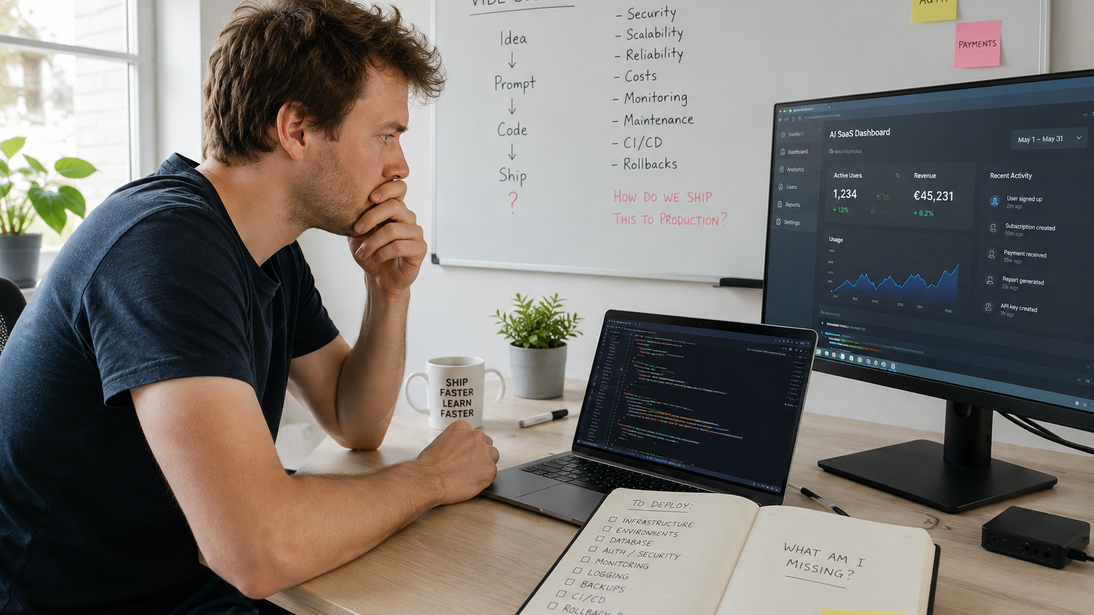
And that's exactly the point of vibe coding. It can give someone without developer experience a working application in an evening. But working is not the same as understood. And as soon as something breaks, the application needs to go to production, or a colleague asks a completely reasonable question about how it is built, that gap becomes your problem.
At Smartshore we call that step from working prototype to safe production environment Vibe Code To Production. Not to discourage the enthusiasm of building yourself, I would do it again tomorrow, but to help teams take that step safely, so a good idea doesn't get stuck on lost data, an incomprehensible codebase, or questions no one can answer.
Contact us